Problems with PayPal


PROBLEM #1: Customer's funding options are not available during checkout.
This problem WILL prevent customers from placing orders.

"PAY" PAGE

URL: https://www.paypal.com/cgi-bin/webscr?__track=_cart:p/xcl/pay/buy-index-blank_reg:_xclick-user-submit

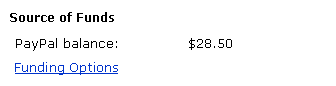
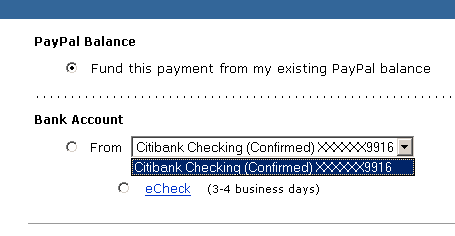
When the customer is ready to place their order, they login and are taken to the "Pay" page. The screenshot above shows a detail of the "Source of Funds" area on the "pay" page.

Here, "PayPal balance" is the default funding source.

There is no explanation of what "PayPal balance" is, nor a link. The customer must leave the checkout process, go to PayPal's website, and search around for half an hour to learn what "PayPal balance" is.

The customer should be able to change the source of funds if more than one source has been activated in their account. Minimally, a BUTTON that says "change source of funds" would make this much clearer. Ideally, all of the customer's funding options should be available on this page.

LOOK AT THE NEXT SCREENSHOT TO SEE WHAT HAPPENS WHEN THE CUSTOMER CLICKS "FUNDING OPTIONS."


"FUNDING OPTIONS" PAGE

URL: https://www.paypal.com/cgi-bin/webscr?__track=_xclick-user-submit:p/xcl/pay/buy-confirm:_xclick-payment-confirm-submit

When the customer clicks "Funding Options" on the "Pay" page, they are taken to the "Funding Options" page.

This page should display all of the options the customer has activated in their account, but it doesn't.

Also, once a radio button is clicked, it cannot be unclicked.

In this example, "Fund this payment from my existing PayPal Balance" is checked by default. If the customer checks "From Citibank Checking," the PayPal Balance radio button is cleared. But if the customer clicks both "From Citibank Checking" and "eCheck." the "eCheck" radio button cannot be unchecked. The only way to NOT select "eCheck" and clear both Bank Account radio buttons is to check the "Fund this payment from my existing PayPal Balance" radio button. If the user then checks "From Citibank Checking," the "eCheck" radio button is automatically checked again.


The customer does NOT have access to the accounts they have on file.

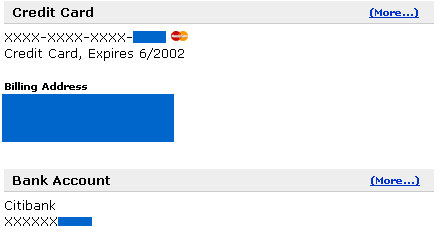
This customer has both a credit card and a bank account on file in their PayPal account, but only the checking account is available as a funding option in the shopping cart.

The screenshot below from the "Profile" area shows that this customer has both a credit card and bank account activated in their account:


PROBLEM #2: THE CUSTOMER IS NOT ABLE TO ADD A FUNDING OPTIONS DURING A SHOPPING CART SESSION
This problem WILL prevent customers from placing orders.

I don't have a screenshot for this because it is a missing feature.

If a customer goes to PayPal.com and signs up, they are NOT specifically instructed to enter bank account or credit card information prior to making a purchase. They are dropped off in the account area and left to guess what to do next.
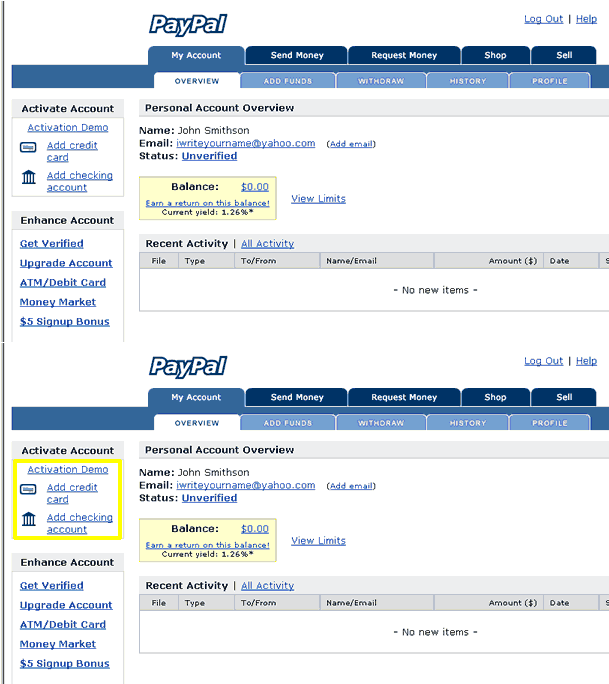
If the customer begins a shopping cart session but does not have a PayPal account, they are prompted to sign up:
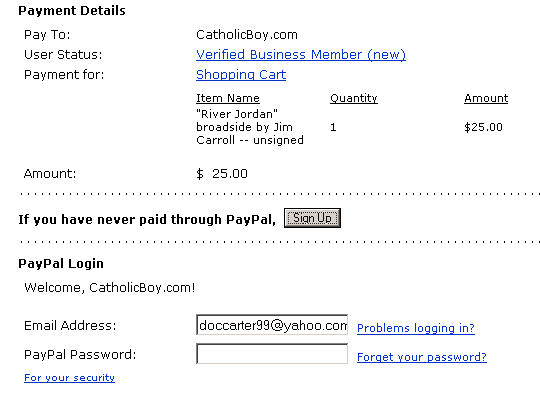
Clicking on the "Sign Up" button takes the customer into a registration process that only allows them to enter their credit card information. The customer is not able to enter their bank account:
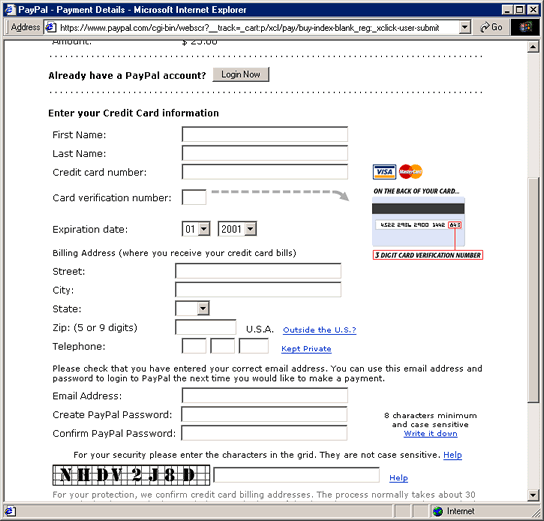
I am not sure what happens after this page, but my guess is that the customer is dropped off in the Account area, again left to guess what to do next. I don't know how the customer ends up back in the shopping cart, but I imagine by this point they have forgotten why they were signing up for PayPal in the first place.

Finally, as described in Problem #1, the customer is not able to add a checking account within the shopping cart process:


Because the signup process is so confusing, I have prepared a web page that explains to my customers how the process works. It is available at http://www.catholicboy.com/paypal.asp


PROBLEM #3: INCORRECT DISPLAY OF LOGO
This problem will be extremely significant to merchants concerned about branding.

THIS IS THE CORRECT LOGO

URL: https://www.paypal.com/cart/add=1&business=doccarter99%40yahoo.com&item_
name= %22River+Jordan%22+broadside+by+Jim+Carroll+--unsigned&amount=25.00&
image_url=http%3A//www.catholicboy.com/images/printable_logo.gif
&return=
http%3A//www.catholicboy.com/thankyou.asp&cancel_return=http%3A//www.catholicboy.com/


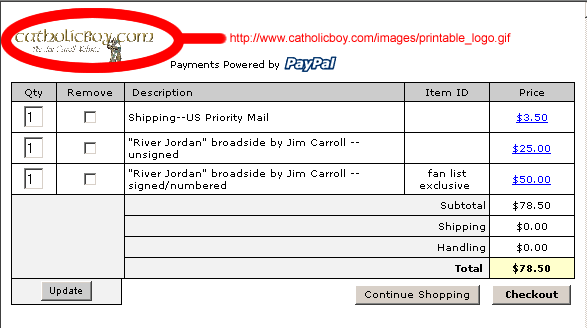
The screenshot above shows the shopping cart screen as it first appears when a customer places an order.

It shows the correct logo (although too small to be legible):

It would be very considerate of PayPal to provide size specifications for logos to avoid problems with legibility and distortion.


HERE IS THE PROBLEM:


URL: https://www.paypal.com/cart/checkout=1


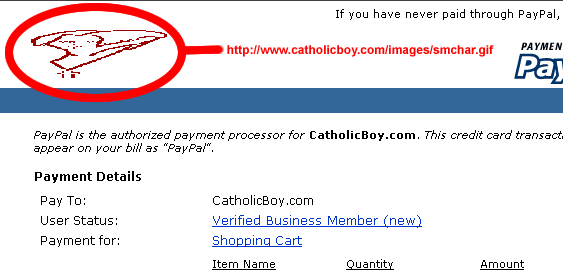
The screenshot above shows the logo that appears on all other pages in the ordering process, like when the customer clicks a "view cart" or "checkout" button.
It shows the WRONG logo, very distorted.

There is nothing in the HTML code I can find that specifies this logo should be displayed. Likewise, I am unable to find any setting in my account preferences that specifies this logo should be displayed.

NOTE: apparently this does not happen on Mac.


THE LOGO DOES NOT DISPLAY AT ALL IN NETSCAPE.


PROBLEM #4: LACK OF BROWSER NAVIGATION
This is a crucial usability issue.

POPUP WINDOW


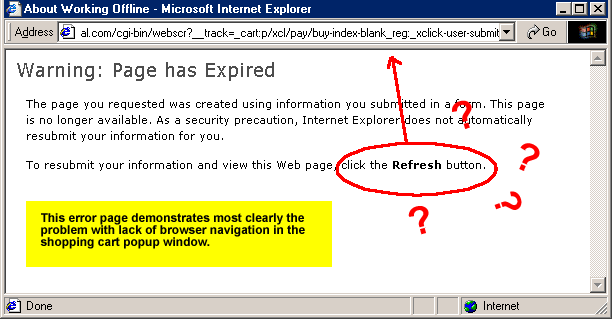
The automatically-generated shopping cart code produces a popup window with no browser navigation.

Additionally, there are no "back" buttons in the checkout process.

The customer is therefore unable to navigate backwards except by right-clicking with the mouse.

If the customer does navigate backwards, they get the error message shown above, with the extremely unuseful suggestion to "click the Refresh button" -- highlighting the fact that there is no Refresh button.